
PS5 SSDs that can run GTA 6
A PS5 can run GTA VI from its built-in SSD or from a compatible M.2 NVMe SSD installed inside the console. A USB drive gives you a place to store PS5 games between sessions. To play a PS5 game stored on USB, copy it back first.
On this page
Check these specifications before ordering
Check that the drive uses NVMe and that its height, including the heatsink, fits the PS5 slot.
| Item | Sony’s PS5 specification |
|---|---|
| Interface | PCIe Gen4 x4 NVMe, M-key. SATA M.2 drives are incompatible. |
| Capacity | 250 GB to 8 TB |
| Read speed | 5,500 MB/s or faster recommended |
| Cooling and fit | Heatsink or another suitable cooling structure. Maximum combined width 25 mm and thickness 11.25 mm. |
| Length | 30, 42, 60, 80 or 110 mm |
Compatible 1 TB PS5 drives
The 1 TB WD_BLACK SN850P includes a heatsink and is licensed for PS5. Look for model WDBBYV0010BNC-WRSN when comparing prices.
SanDisk’s successor is the Optimus GX PRO 850P. The 1 TB model with a heatsink is SDSG81100TAH-000E0. Best Buy lists it under SKU 6685723.
Install the game on the drive
Sony provides different cover-removal instructions for different PS5 models. Follow the diagram for yours. The console formats a new SSD, which erases existing files on that drive. After setup, choose Settings, Storage, then Installation Location to install new games there.
For a game already installed, highlight its tile in Game Library, press Options, and choose Move Games and Apps. Select the M.2 destination. Sony requires the entire game to fit in one location.
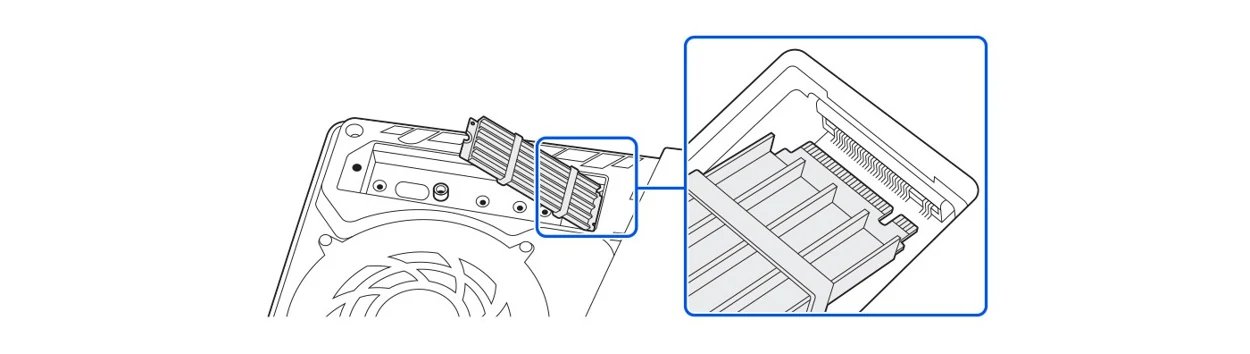
Sony shows the expansion bay, the angle of the drive as it enters the socket, the fastening screw and the slot cover. The demonstration covers CFI-2000 and CFI-7000 consoles.
When an existing USB drive will do
If you have a compatible USB drive and only need space for GTA VI, move a PS5 game you have finished onto USB and leave GTA VI on the built-in SSD. Keeping the archived game saves the trouble of downloading it again.