
GTA 6 install size and free space
Allow up to 212 GB on the drive where you plan to install GTA VI. Rockstar gives one upper figure for the launch versions on PS5 and Xbox Series X|S. Your console shows the space it needs for the version you are installing.
On this page
Free space calculator
Subtract your free space from Rockstar’s launch estimate of 212 GB. Use the requirement on your console if it differs.Check the drive that will run the game
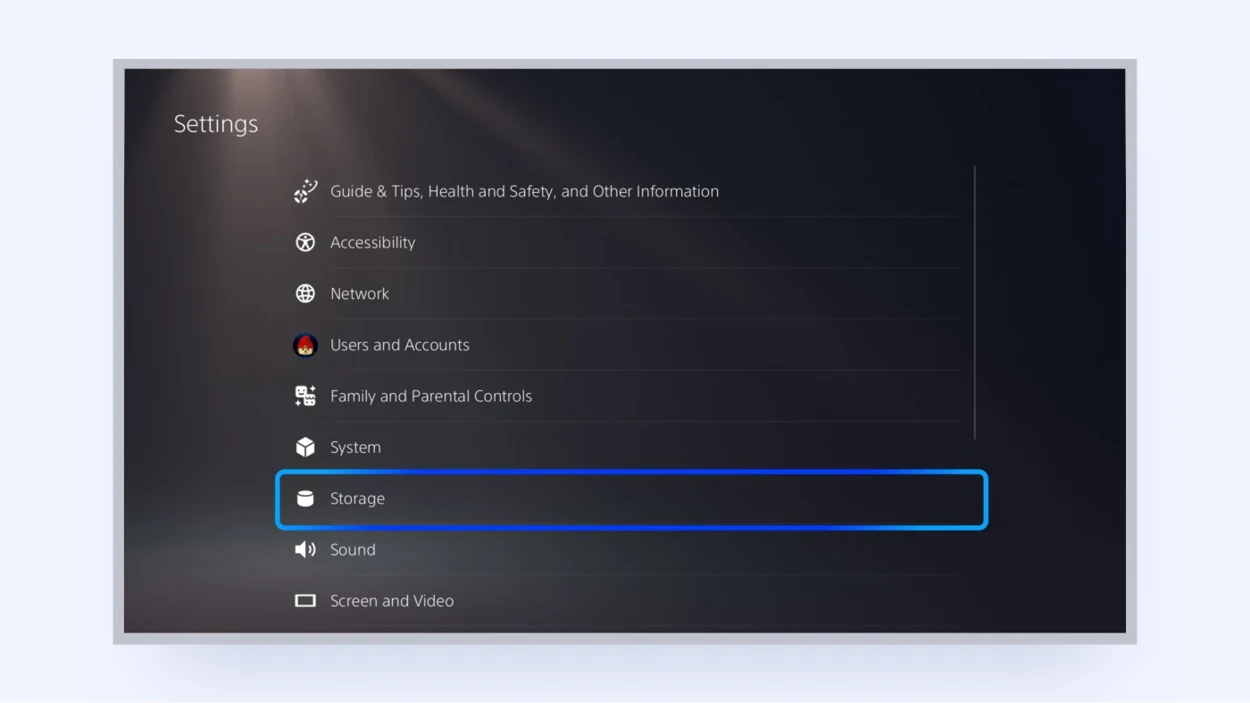
On PS5, open Settings, then Storage. Select console storage or your installed M.2 SSD. On Xbox Series X|S, open My games & apps, then Manage and Storage devices. Read the free space on the internal SSD or the expansion card you plan to use. A console with 150 GB free internally and 100 GB free on USB still needs room on the drive that runs the game.
Work out the shortfall
These examples use Rockstar’s 212 GB figure. If the installation screen gives a different requirement, use that number instead. For example, an install asking for 200 GB on a drive with 180 GB free needs another 20 GB.
| Free on the destination drive | Space to free for a 212 GB install |
|---|---|
| 90 GB | 122 GB |
| 150 GB | 62 GB |
| 200 GB | 12 GB |
| 250 GB | No additional space. About 38 GB would remain. |
Make room before buying a drive
Moving another installed game to a USB drive can solve a one-time space problem. If you want to keep several large games ready to play, an internal PS5 M.2 SSD or an Xbox Storage Expansion Card adds playable space. The two consoles use different hardware.
Read the installation and download numbers separately
Free space is what the console needs on the drive. The download queue shows how much data it still has to fetch. Use the queue for transfer time or an internet data cap. A later update can change both figures.