
GTA 6 car controls on PS5 and Xbox
Hold D-pad Left in the driver’s seat. If you see radio stations, push the right stick up to Vehicle. Find Window, Hazards, Headlights or Engine with L1/R1 on PS5 or LB/RB on Xbox. Press Cross on PS5 or A on Xbox to use the highlighted control.
On this page
Car controls on PS5 and Xbox
These buttons use the default layout. For actions that start with Vehicle, open the menu and bring the named tile into the white frame first.
| Action | PS5 | Xbox Series X|S |
|---|---|---|
| Open the vehicle menu | Hold D-pad Left | Hold D-pad Left |
| Roll the window down or up | Vehicle → Window → Cross | Vehicle → Window → A |
| Signal left or right | Tap D-pad Left or Right | Tap D-pad Left or Right |
| Switch on both hazard lights | Vehicle → Hazards → Cross | Vehicle → Hazards → A |
| Change headlights | Vehicle → Headlights → Cross | Vehicle → Headlights → A |
| Duck in the driver’s seat | Hold Circle | Hold B |
| Silence or resume the radio | Double-tap D-pad Left | Double-tap D-pad Left |
| Use the horn | Click the left stick (L3) | Click the left stick |
| Shut the engine off while seated | Vehicle → Engine → Cross | Vehicle → Engine → A |
| Get out with the engine running | Stop, then double-tap Triangle | Stop, then double-tap Y |
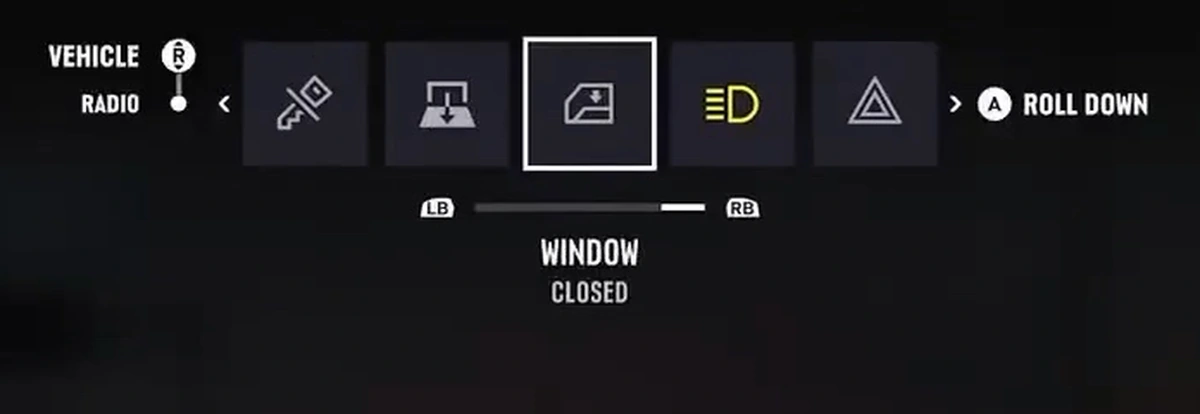
Switch from the radio to the vehicle menu
Hold Left until the strip appears across the top of the screen. Station logos mean you’re on Radio. Push the right stick up once to see the car icons. Use the bumpers to move the white frame to the control you want.
Read the word below the selected tile and the command to its right. For example, Window can say Closed while the button prompt says Roll Down. Release D-pad Left to return to driving.
Vehicle menu buttons
- Open the menuHoldPS5D-pad ←XboxD-pad ←
- Switch from Radio to VehiclePush upPS5Right stickXboxRight stick
- Move one tile left or rightPress eitherPS5L1 or R1XboxLB or RB
- Use the selected controlTapPS5CrossXboxA
Roll down a window, open the trunk or lower a convertible roof
Select Window and confirm Roll Down. When the window is open, the same button rolls it up. You can do this from the driver’s seat before you pull away.
On Jason’s ’70 Vapid Ganado pickup, select Tailgate to lower or raise the rear panel. Other cars can show a trunk or a Convertible Roof tile instead. In a convertible, confirm the roof action and close the menu to see the top move. A fixed-roof car has no convertible-top control.
How do you lower a convertible roof in GTA 6?
From the driver’s seat, hold Left on the D-pad and push the right stick up to Vehicle. Select Convertible Roof, confirm with Cross on PS5 or A on Xbox, then close the menu.
How do you roll down the car window in GTA 6?
Hold Left on the D-pad in the driver’s seat. Push the right stick up from Radio to Vehicle, highlight Window and confirm Roll Down with Cross on PS5 or A on Xbox.
The driver opens the menu in a yellow pickup, switches from station logos to the car controls, then selects Window. Watch the prompt change as the glass moves.
Gameplay by Games & Apps Tutorials on YouTube
Use turn signals, hazard lights and high beams
Tap Left or Right on the D-pad to signal in that direction. A short tap of Left works the indicator. Keeping it held opens the radio and vehicle menu. For both indicators together, select Hazards and confirm Turn On. Select it again to switch them off. Traffic may leave a gap when you signal, but wait until you see room in the lane.
Push Square demonstrates Circle cycling the headlights on PS5. Hold Circle or B and your driver ducks instead. For a particular beam, select Headlights in the Vehicle row and watch the label. Cycle through Automatic, Low Beam, High Beam and Off until you reach the setting you want.
How do you use turn signals and hazard lights in GTA 6?
Tap Left or Right on the D-pad to signal a turn. To flash both sides, hold Left, move up to the Vehicle row, select Hazards and confirm.
Leave the engine running when you get out
Bring the car to a complete stop with the engine on. Double-tap Triangle on PS5 or Y on Xbox to step out and leave it running. At speed, the same double-tap makes your character jump out.
To sit in the parked car with the engine off, stay in the driver’s seat. Open the Vehicle row, select Engine, then confirm Turn Off. The Engine tile shows whether the motor is running.
How do you leave the engine running when you get out in GTA 6?
Come to a complete stop with the engine on. Double-tap Triangle on PS5 or Y on Xbox to get out and leave the car running.
Speak to someone from the driver’s seat
Put the weapon away and hold D-pad Up while looking toward a pedestrian to bring up their interaction prompts. Click the right stick for a shout. For the hand gesture, use R1 on PS5 or RB on Xbox with empty hands.
Square on PS5 or X on Xbox swings a car door. The same button makes a motorcyclist kick to the side. On foot, walk into the front or rear of a stranded vehicle to start pushing. Hold Square or X for a harder shove if it is stuck.
Sources
- PS5 vehicle menu screens
- Xbox dashboard footage in the Ganado
- ShowGamer vehicle menu and convertible roof controls
- Xbox default button layout
- PS5 driving controls and headlight modes
- Vehicle exit and engine controls
- Sammy Barker, Push Square · vehicle controls, passenger seats and partner commands
- Morgan Park, PC Gamer · radio shortcuts, navigation, earbuds and rest poses
- GTA6DATA · in-game Help screens for social interaction, the radio and vehicle functions
- GTABase · Default controller screens for PS5 and Xbox
- Zack Zwiezen, Kotaku · vehicle shortcuts and headlight input