GTA 6 controller layout on PS5 and Xbox
To see your current buttons, pause GTA VI, open Settings and select Control Scheme. Pick the activity you want to change. On the Default scheme, click the left stick to run, press Cross on PS5 or A on Xbox to jump, and use the touchpad or View button to open the map.
On this page
Default buttons for common actions
These buttons use the Default scheme. If yours work differently, check both the in-game scheme and the console’s button mapping. Cross is the bottom face button on DualSense.
| Action | PS5 | Xbox Series X|S |
|---|---|---|
| Run on foot | Click L3 | Click left stick |
| Jump or climb | Cross | A |
| Crouch | Circle | B |
| Interact with an object | Triangle | Y |
| Open the map | Touchpad | View |
| Accelerate in a car | R2 | RT |
| Brake or reverse | L2 | LT |
| Use the handbrake | Cross | A |
The menu cycles through On Foot, Aiming, Cover and Land/Water Vehicles. Each diagram labels the buttons for that activity.
Default controls on foot
- RunClickPS5L3XboxLeft stick
- Jump or climbPressPS5CrossXboxA
- CrouchPressPS5CircleXboxB
- Interact with an objectPressPS5TriangleXboxY
- Open the mapPressPS5Touch padXboxView
Switch the layout inside the game
Control Scheme offers Default, Classic and Left-Handed. Preview the controls for the activity you play most before changing the preset. The same button can jump on foot and act as a handbrake in a car. Rockstar provides separate diagrams for on-foot movement, land and water vehicles, aircraft, bicycles, swimming and parachuting.
For stick inversion or look sensitivity, open Controller in the game settings. For an uncomfortable trigger or vibration on PS5, adjust the DualSense settings instead.
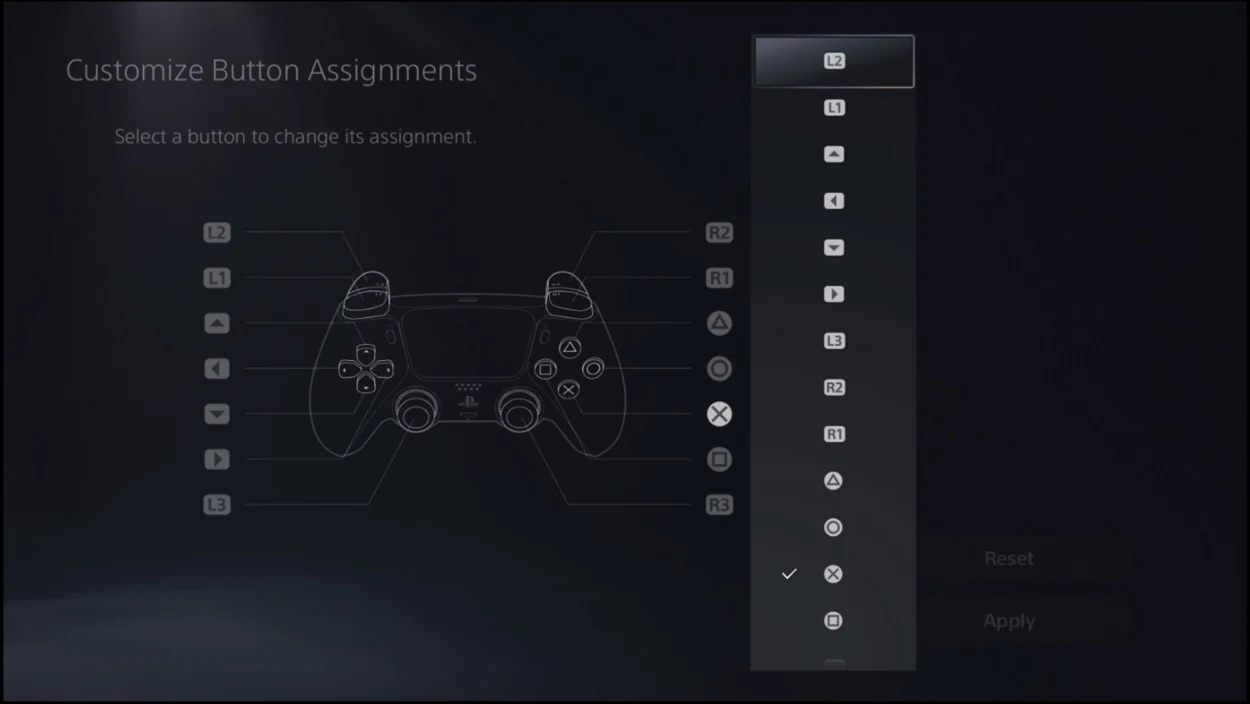
Change a specific physical button
On PS5, open the console’s Settings, then Accessibility, Controllers and Custom Button Assignments for DualSense Wireless Controller. Choose the button, assign its new function and select Apply. Xbox offers controller-level button mapping through the Xbox Accessories app. These changes can affect how other games respond to the same controller, so use an in-game preset when the change is for GTA VI alone.