
Research review · Controllers
Sony DualSense Edge wireless controller review
Buy the white DualSense Edge if you can already name two actions you want under your middle fingers. Jumping and turning the camera at the same time is a lovely reason to upgrade a PS5 pad. A case full of spare stick caps is a much weaker one. For someone who loves the standard DualSense and mostly wants longer wireless sessions, I’d keep the controller that came with the console.
- Model
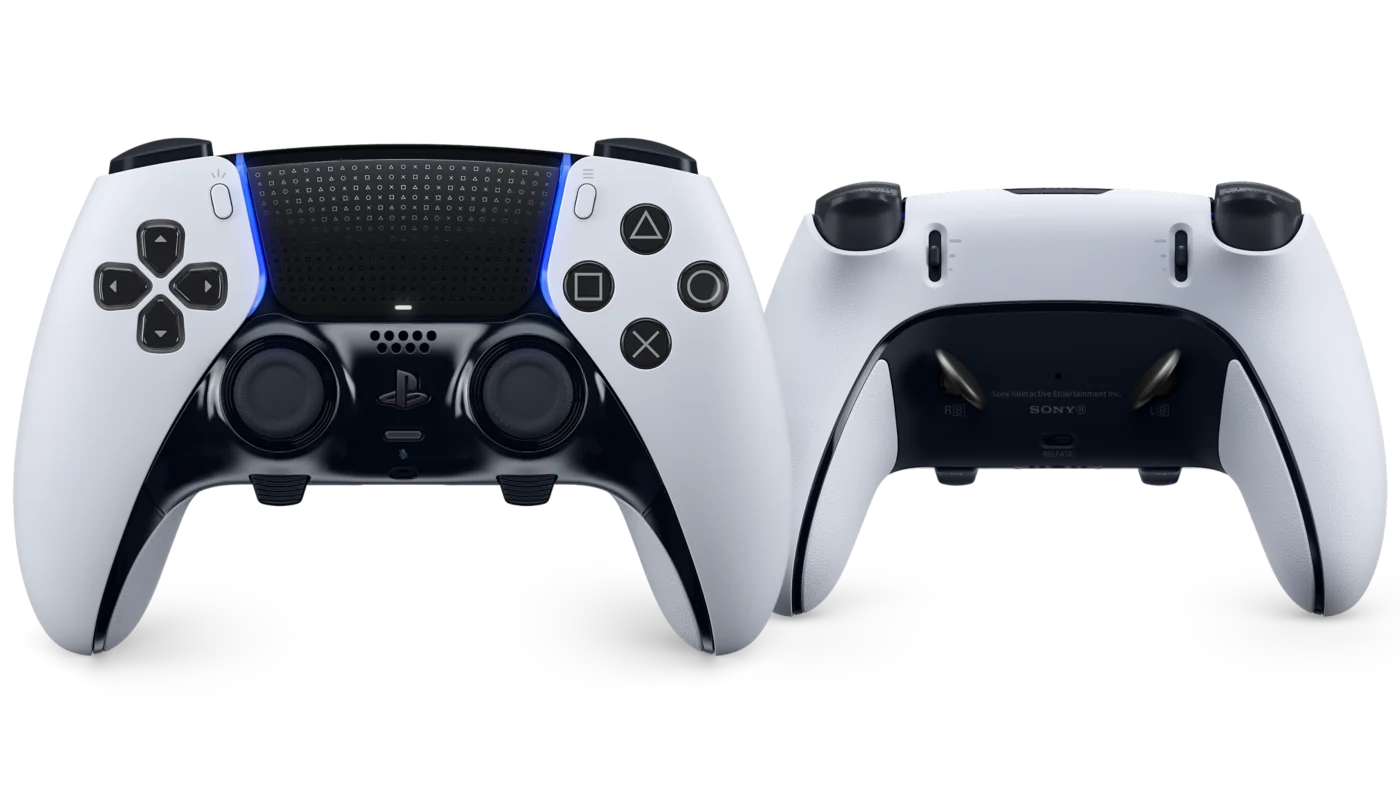
- CFI-ZCP1, original white model with a black touchpad and two Fn buttons.
- Rear buttons
- Two sockets. Fit the half domes or the longer levers. Each socket takes one button.
In this review
- Who should buy it?
- Specifications
- In the box
- Put a dodge under your middle finger
- Short triggers cost you the adaptive effect
- Take a PS5 layout to a Windows PC
- Battery life favors a desk over a distant sofa
- Stick caps and stick modules solve different problems
- Charging and checking a used Edge
- Alternatives
- Questions before you buy
- Manuals and sources
Who should buy it?
Buy it if
You take your thumb off the right stick to jump or dodge, or you want the same button layout on PS5 and Windows.
Skip it if
You want four rear inputs, play marathon sessions away from a charging cable, or mainly want the haptics you already get with a standard DualSense.
Specifications
- Model
- CFI-ZCP1, original white model with a black touchpad and two Fn buttons.
- Rear buttons
- Two sockets. Fit the half domes or the longer levers. Each socket takes one button.
- L2 and R2
- Three stops per trigger. Adaptive resistance works at full travel in supported games and switches off at the two shorter settings.
- Onboard profiles
- One default and three custom layouts. Switch with Fn and a face button.
- PC connection
- USB or Bluetooth. Some games require USB for adaptive triggers or haptics.
In the box
The original white kit includes the controller with its two standard caps, two high-dome caps, two low-dome caps, two half-dome rear buttons, two lever rear buttons, a braided USB cable, a locking connector housing and a carrying case. The case has a space for a replacement stick module. Sony sells that module separately.
Put a dodge under your middle finger
Think about the last time you rolled past an enemy and lost sight of it. If dodge lives on Circle, the same thumb steers the camera and reaches for Circle. Assign Circle to a rear button. Your middle finger can now start the roll while your thumb follows the enemy through it. Put jump on the other side if you want the same freedom in the air.
The two button shapes change where your finger meets the switch. The long levers reach farther down the grips, and their left and right markings matter when you fit them. The smaller half domes fit either side. Tom’s Guide reviewer Dave Meikleham preferred the levers after using both, and mapped melee to the rear in Returnal. If a button sits against a finger you tense during a difficult fight, try the other shape before abandoning the layout.
PlayStation Support · rear button shapes and trigger stops · Tom’s Guide · Dave Meikleham’s rear button and game profiles test
Short triggers cost you the adaptive effect
The little sliders behind L2 and R2 physically shorten each pull. A short R2 is an appealing setup for a shooter where you tap to fire. For a racing game, the longer pull gives your finger more travel to meter out the throttle. You can set the two sides independently.
Sony disables adaptive trigger resistance at medium or short travel. If you bought a PS5 because you enjoy a game pushing back against your finger, put the slider back at full travel when you finish playing the shooter. Changing the software profile alone won’t move that switch.
PlayStation Support · rear button shapes and trigger stops · Sony CFI-ZCP1 instruction manual · kit and module replacement
Take a PS5 layout to a Windows PC
Sony’s PlayStation Accessories app on Windows can now create profiles and update the Edge firmware. Give a shooter and a driving game separate layouts and assign each one to a face-button shortcut. Holding Fn and pressing Triangle restores the default layout. That’s a handy escape hatch when a game’s tutorial asks you to press a button you moved an hour ago.
The mappings travel on the controller. Support for Sony’s feedback features belongs to the game. Sony lists USB and Bluetooth for PC input and says some games require USB for haptic feedback or adaptive triggers. Try the included cable in a game that advertises those features before you spend time rebuilding a working profile.
PlayStation Accessories · Windows profile editor and input tester · PlayStation · features, connections and charging station compatibility
Battery life favors a desk over a distant sofa
Tom’s Hardware reviewer Andrew E. Freedman got about five hours from his Edge with haptics and rumble enabled and the controller light on bright. His mix included Fortnite, Rocket League and Spider-Man: Miles Morales. That is one reviewer’s result under stated settings. It’s enough to make charging between long sessions part of the buying decision.
At a desk the braided cable and clip-on housing make a reasonable wired setup. On a sofa, measure the run to the PS5 and think about who walks across it. Having to string a cable through the living room halfway through the evening would sour this upgrade for me much faster than having room for only three custom layouts.
Tom’s Hardware · Andrew E. Freedman’s battery test · PlayStation · features, connections and charging station compatibility
Stick caps and stick modules solve different problems
A taller cap changes the height of the stick under your thumb. It still sits on the same mechanism, so changing the cap won’t cure drift. If the character moves with the stick released, first check the input range with the controller tester in PlayStation Accessories. Check a second game as well before blaming the module.
If a stick mechanism actually needs replacement, the front cover comes off and the module slides out after you lift its retaining lever. The left and right use the same module. Sony launched the controller at US$199.99 and a replacement module at US$19.99. Those launch prices explain the appeal of changing one part. Check the current spare price and availability before treating repairability as the deciding feature.
Sony CFI-ZCP1 instruction manual · kit and module replacement · PlayStation Accessories · Windows profile editor and input tester · PlayStation Blog · original kit and US launch prices
Charging and checking a used Edge
A DualSense charging station you already own can charge the Edge. Leave the spare caps and rear buttons in the molded case so the small pieces stay paired. If you charge inside the case, open its cable flap. For a used controller, ask to see both sticks centered in the input tester and check that both rear slots register with a button fitted.
Alternatives
- Sony DualSense wireless controller
- Keep the standard PS5 pad if you value adaptive triggers and haptics and are happy with your current button reach. The Edge premium buys remapping, physical adjustments and replaceable stick modules.Buy on Amazon Paid link
- Xbox Elite Wireless Controller Series 2
- For a Windows and Xbox setup, the full Series 2 kit includes four rear paddles. That lets you move all four face-button actions underneath at once. The Elite is an Xbox and PC choice, so a PS5 player should stick to a PlayStation-compatible model.Buy on Amazon Paid link
Questions before you buy
Can all four included back buttons go on at once?
The Edge has two rear sockets. Sony supplies a pair of lever buttons and a pair of half domes so you can choose the shape under each finger.
Will my custom settings work on a PC without owning a PS5?
Yes. Use PlayStation Accessories on a Windows PC to create and assign a layout. Use Fn and its assigned face button to activate it. The game still needs to support any haptics or adaptive trigger effects you want to use.
Does the white Edge include a spare stick module?
The controller ships with two installed modules and spare caps for them. A third module for a future repair is a separate purchase.
Manuals and sources
- PlayStation · features, connections and charging station compatibility
- Sony CFI-ZCP1 instruction manual · kit and module replacement
- PlayStation Support · rear button shapes and trigger stops
- PlayStation Accessories · Windows profile editor and input tester
- Tom’s Hardware · Andrew E. Freedman’s battery test
- Tom’s Guide · Dave Meikleham’s rear button and game profiles test
- PlayStation Blog · original kit and US launch prices
- Xbox · Elite Series 2 paddles and platform support