
Research review · Headsets
SteelSeries Arctis Nova 5X Wireless review
I’d buy the Nova 5X to share between an Xbox and a gaming PC. Move the transmitter, flip its switch and you’re back on voice chat. It works on PS5, too. The one thing I’d miss is hearing my game while I’m on Discord on my phone. The 5X switches between them. I’d pay extra for the Nova 7X Gen 2 if that’s where my party meets.
- Xbox wireless
- 2.4 GHz via the USB transmitter in Xbox mode. Supports Xbox Series X|S and Xbox One with the included USB-A adapter cable.
- PC and PlayStation
- Set the transmitter to USB. The ChatMix dial works on PC with SteelSeries GG/Sonar. On PS5, adjust chat balance in the console’s party controls.
In this review
- Who should buy it?
- Specifications
- In the box
- One transmitter for three machines
- Phone calls, Discord and the missing mix
- Footsteps, bass and game EQ presets
- Microphone clarity and keyboard noise
- Wireless battery life and headset fit
- Replacement cushions, headband and transmitter
- Alternatives
- Questions before you buy
- Manuals and sources
Who should buy it?
Buy it if
You move between Xbox, PS5 and PC and use voice chat on the machine running the game.
Skip it if
You want game audio and a phone call in your ears together, or a 3.5 mm cable you can plug in when the battery runs down.
Specifications
- Xbox wireless
- 2.4 GHz via the USB transmitter in Xbox mode. Supports Xbox Series X|S and Xbox One with the included USB-A adapter cable.
- PC and PlayStation
- Set the transmitter to USB. The ChatMix dial works on PC with SteelSeries GG/Sonar. On PS5, adjust chat balance in the console’s party controls.
- Bluetooth
- Bluetooth 5.3. Quick Switch selects phone or game audio, one at a time.
- Weight and fit
- 265 g according to SteelSeries. The suspension band and earcup height adjust separately.
- Rated battery life
- Up to 50 hours on the transmitter or 60 hours on Bluetooth, according to SteelSeries.
- Tested battery life
- 42 hours 10 minutes on the PC transmitter at roughly half volume in SoundGuys’ test.
In the box
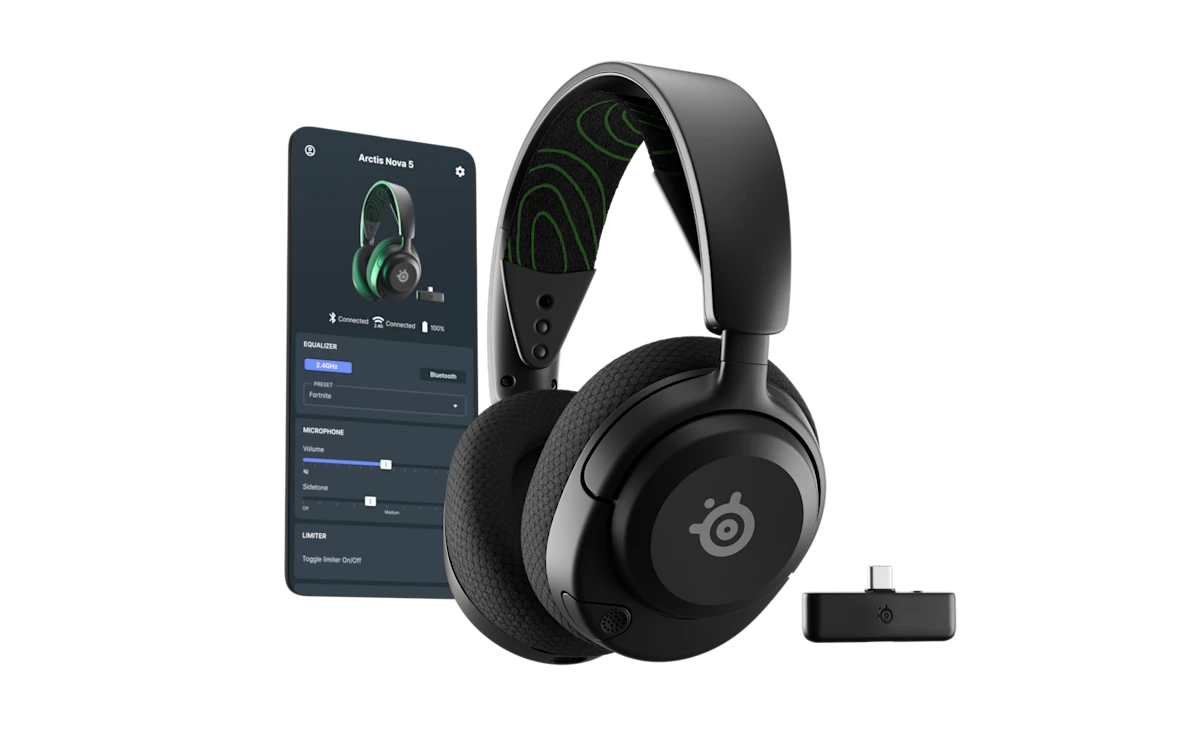
The black Xbox model is 61676. SteelSeries includes the headset, its switchable USB-C transmitter, a 1.5 m USB-C-to-USB-A adapter cable and a separate 1.5 m charging cable. The adapter lets you leave a reachable plug at the front of the desk even if the PC's USB ports face the wall.
One transmitter for three machines
The most useful control on the 5X is on the transmitter. Set it to Xbox and connect it to a Series X, Series S or Xbox One using the included adapter. Move it to your PC or PlayStation and slide the switch to USB. If the headset was working at your desk and the console suddenly seems deaf, check that switch first. The Xbox marking on the box is worth looking for even if you also own a PS5.
The ChatMix dial balances your teammates against the game on Xbox. On a Windows PC, SteelSeries supplies the game and chat channels through GG's Sonar software. On PS5, game sound and the microphone work over the transmitter, but the headset dial can't adjust their balance. Use the PlayStation party controls for that.
SteelSeries · Nova 5X product information guide, package contents and controls · SteelSeries · Nova 5X connections, platform features and photo · WIRED · hands-on Nova 5X console and PC use
Phone calls, Discord and the missing mix
If your phone rings during a game, press Quick Switch once to take the call, and the headset returns to the dongle when the call ends. For a delivery at the door, that's exactly what I'd want. For a raid leader calling instructions from the Discord app on your phone, losing the encounter audio is a lousy trade.
Keep game and chat on the same machine when you can. The two radios can remember their connections and each can keep its own equalizer setting. They still feed the earcups one at a time. SteelSeries explicitly gives the Nova 7X Gen 2 the simultaneous game-and-mobile playback missing here.
SteelSeries · Nova 5X product information guide, package contents and controls · SteelSeries · Nova 5X connections, platform features and photo · SteelSeries · Nova 7X Wireless Gen 2 simultaneous playback
Footsteps, bass and game EQ presets
PC Gamer's Andy Edser tried the game-specific settings and heard clear positional cues across several presets. He found the lowest bass less convincing, even with the bass-heavy music setting selected. That makes the 5X a more interesting buy for hearing which doorway a sound came from than for making every explosion shake.
The companion app stores separate EQ settings for the transmitter and Bluetooth. Pick a familiar game, listen to the same scene with its preset and the default, then keep the one that lets you hear both an approaching player and your teammate. Your music setting can stay exactly where you like it.
PC Gamer · Andy Edser's Nova 5X listening, mic and fit observations · SteelSeries · Nova 5X connections, platform features and photo
Microphone clarity and keyboard noise
Pull the boom fully out and turn its front toward the corner of your mouth. In SoundGuys' Helldivers 2 sessions, teammates could understand Adam Birney clearly. Its office recording also picked up keyboard noise. PC Gamer heard hard consonants hitting the mic. Both are good reasons to position it beside your mouth before reaching for a noise filter.
SoundGuys publishes samples from a quiet room, an office and a reverberant space. Listen to the one that resembles your room if voice quality is the deciding factor. The ear pads provide passive isolation. You may still hear the keyboard yourself in a shared room.
SteelSeries · Nova 5X product information guide, package contents and controls · SoundGuys · Adam Birney's Nova 5X battery test, isolation findings and mic recordings · PC Gamer · Andy Edser's Nova 5X listening, mic and fit observations
Wireless battery life and headset fit
SteelSeries quotes up to 50 hours on 2.4 GHz and 60 on Bluetooth. SoundGuys ran the 5X from a PC transmitter at about half volume and recorded 42 hours and 10 minutes. That's enough for roughly ten four-hour sessions under those test conditions. A player who mostly games wirelessly should plan around the dongle figure.
Watch the physical fit as closely as the battery spec. The earcups slide and the band has several mounting positions, but Edser found little spare adjustment for a larger head. If you regularly wear a headset at the very end of its rails, the 265 g weight alone won't tell you how this one will fit.
SoundGuys · Adam Birney's Nova 5X battery test, isolation findings and mic recordings · SteelSeries · Nova 5X product information guide, package contents and controls · PC Gamer · Andy Edser's Nova 5X listening, mic and fit observations
Replacement cushions, headband and transmitter
Keep the transmitter with the headset when you pack it. Bluetooth is a useful fallback for a phone or laptop, while the console setup depends on that dongle. SteelSeries lists the ear cushions, suspension strap and transmitter among its replaceable accessories. For a replacement transmitter, match the 5X model and use the manual's pairing procedure.
Alternatives
- SteelSeries Arctis Nova 7X Wireless Gen 2
- Choose it when you want Xbox audio and a call or music from your phone playing together. Its simultaneous Bluetooth connection solves the 5X's biggest limitation.Buy on Amazon Paid link
- SteelSeries Arctis Nova 1
- A wired choice for someone happy to plug into a controller or compatible PC headset jack. There's no transmitter to move and no battery to charge.Buy on Amazon Paid link
Questions before you buy
Can I hear Discord on my phone and Xbox game audio at once?
No. The 5X switches between its Bluetooth and transmitter inputs. Run voice chat on the gaming device or choose a headset that mixes both sources.
Does the Xbox version work on PS5?
Yes. Put the transmitter's switch in USB mode and connect it to the PS5. The microphone and game audio work there. Use the PlayStation party controls to change the balance of voice and game.
Can I plug the headset into the controller when it runs flat?
The 5X has no 3.5 mm input. Its USB-C port is for charging. Keep the transmitter connected for console game audio.
Manuals and sources
- SteelSeries · Nova 5X connections, platform features and photo
- SteelSeries · Nova 5X product information guide, package contents and controls
- SoundGuys · Adam Birney's Nova 5X battery test, isolation findings and mic recordings
- PC Gamer · Andy Edser's Nova 5X listening, mic and fit observations
- WIRED · hands-on Nova 5X console and PC use
- SteelSeries · Nova 7X Wireless Gen 2 simultaneous playback