
Research review · Monitors
Alienware AW3225QF review
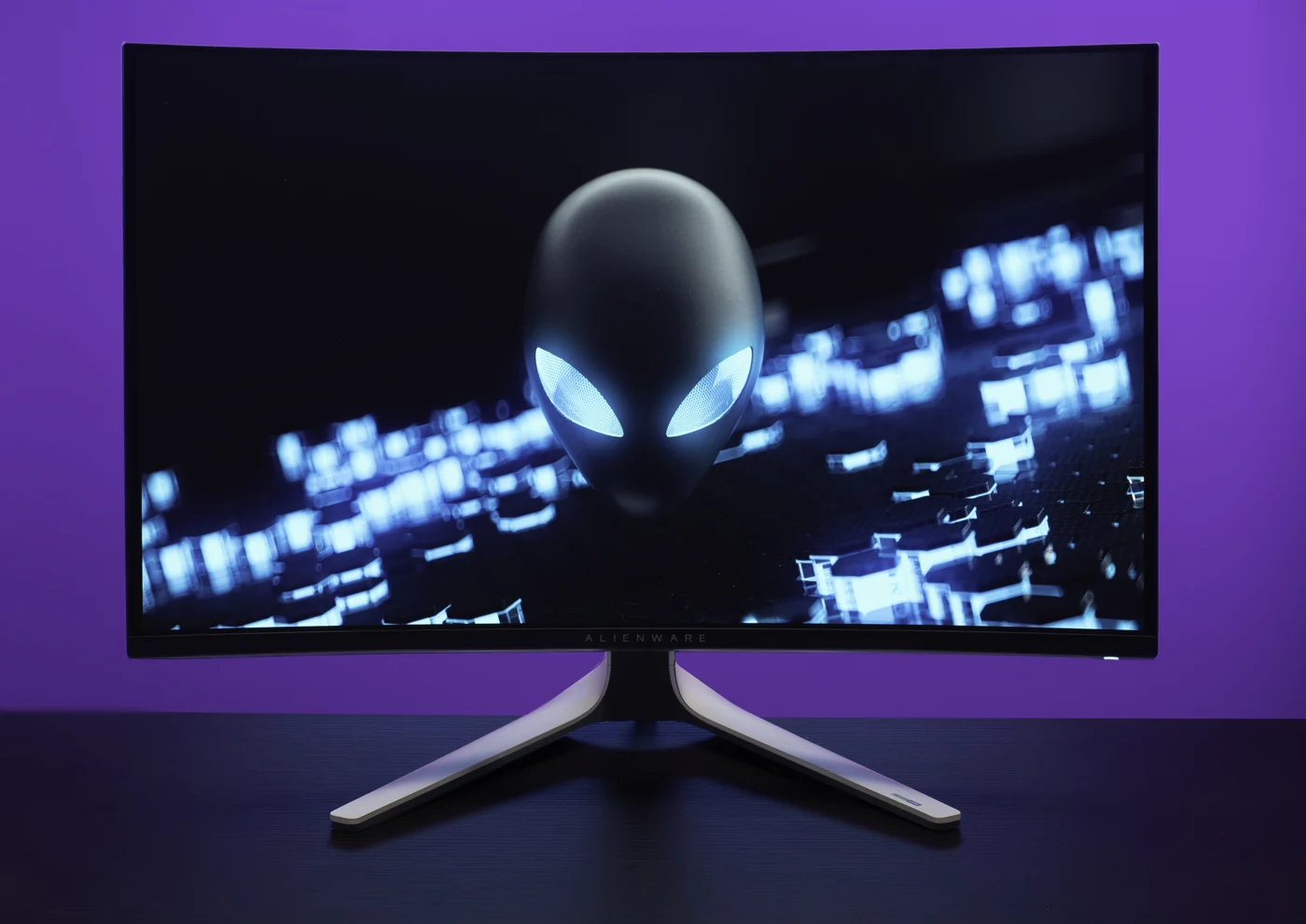
I’d buy the AW3225QF for a fast PC in a room where I can draw the blinds. A neon sign against a black sky looks terrific on OLED, and 240 Hz gives a shooter running above 120 fps room to stretch. A PS5 tops out at 120 Hz. If that’s your only machine and your desk faces a sunny window, I’d keep the money.
- Panel
- 31.6-inch QD-OLED, 3840 × 2160, 16:9, 1700R curve
- PC video
- Up to 4K at 240 Hz over HDMI 2.1 or DisplayPort 1.4 with Display Stream Compression.
Who should buy it?
Buy it if
You want fine detail in a huge RPG and sharp motion in a fast shooter, with an HDMI input free for a console.
Skip it if
Daylight falls directly on the screen, you want one USB-C cable for a work laptop, or your only reason to upgrade a good 4K 120 Hz console display is the 240 Hz label.
Specifications
- Panel
- 31.6-inch QD-OLED, 3840 × 2160, 16:9, 1700R curve
- PC video
- Up to 4K at 240 Hz over HDMI 2.1 or DisplayPort 1.4 with Display Stream Compression.
- Console video
- Up to 4K at 120 Hz over HDMI on PS5 and Xbox Series X.
- Audio
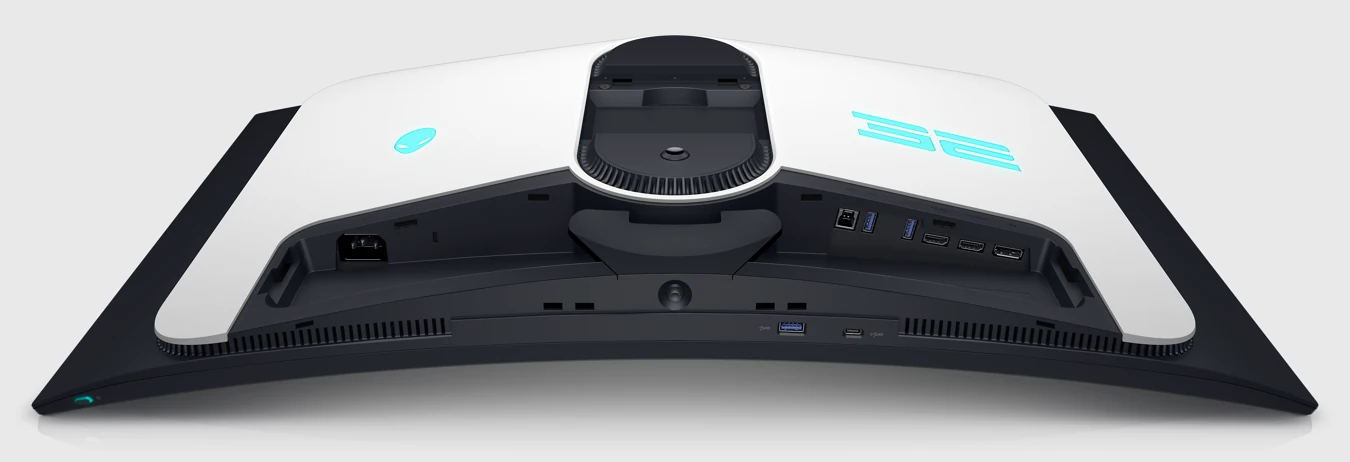
- HDMI eARC on HDMI 1. No built-in speakers.
- Width and depth
- 28.17 in. wide with a stand depth of 12.04 in. Allow room for cables behind the stand.
- Monitor arm
- 100 × 100 mm VESA mount. Panel weight without the stand is 6.0 kg.
In the box
Dell lists an HDMI 2.1 FRL cable, a DisplayPort 1.4 cable and a USB upstream cable with the US model. Use DisplayPort for a compatible desktop PC, HDMI for the console and the upstream cable if you want to use the monitor’s USB hub. The downstream USB-C port is for accessories and charging. A laptop needs a separate video connection.
Two HDR modes worth saving
Try a neon sign on a dark street, then walk the same character out into daylight. TFTCentral measured a peak of 1,014 nits in HDR Peak 1000 mode. Its separate brightness investigation found that the mode gave small, bright details in dark scenes more punch. When a larger share of the picture was bright, the DisplayHDR True Black mode could make the scene look brighter overall.
The comparison takes a minute. Pause in the same spot, switch the monitor’s Smart HDR setting, then look at the pavement and the face under the sign as well as the sign itself. Keep the mode that shows the detail you came to see.
TFTCentral · AW3225QF measurements, screen curve and OLED maintenance · TFTCentral · HDR mode measurements across dark and bright scenes
240 Hz on PC and flicker with variable refresh
At 240 Hz, the screen can start a fresh frame about every 4.17 milliseconds. At 120 Hz the interval is 8.33 milliseconds. Those figures describe the refresh schedule. A game still has to finish its frames quickly enough to use it. Open the frame-rate counter in your favorite shooter and check a busy match before upgrading. A powerful PC that clears 120 fps regularly has a reason to reach higher.
RTINGS found very fast pixel transitions, but also saw flicker as the frame rate fluctuated with variable refresh rate enabled. If dark areas pulse in a demanding game, first try a frame cap you can hold through the busiest scene. Toggle VRR in the same spot to see whether it changes the symptom.
Dell US · AW3225QF specifications, dimensions, supplied cables and panel coverage · RTINGS · AW3225QF instrumented review, motion, room light and console compatibility
A PS5, an Xbox and two HDMI ports
Both HDMI inputs can take a 4K 120 Hz console signal. For a PS5 and a Series X sharing the desk, that means both can stay plugged in while the PC uses DisplayPort. On either console, enable 120 Hz output and select the game’s high-frame-rate mode where available. A game locked to 60 fps still delivers 60 new frames per second.
HDMI 1 also carries eARC audio to a soundbar. Give that socket to a bar and one HDMI input remains for a console. I’d choose a headset for a two-console desk before agreeing to swap HDMI cables every night.
Dell US · AW3225QF specifications, dimensions, supplied cables and panel coverage · Dell Technologies · AW3225QF and AW2725DF announcement and console support · Dell monitor support · HDMI 1 audio return-channel connection · RTINGS · AW3225QF instrumented review, motion, room light and console compatibility
Glare, black levels and stand depth
QD-OLED pixels can turn off individually. Picture a bright crosshair against a black doorway. The neighboring pixels can stay dark without a backlight illuminating a larger patch of screen. RTINGS found that room light raised blacks toward purple and that the monitor struggled with intense glare. At a desk opposite a bright window, those deep blacks can look washed out.
I like the shallow curve for a single chair centered on a large display. I’m less keen on spending 12 inches of desk depth on the stand. Mark out its footprint while your keyboard, mouse mat and speakers are still on the desk. If it pushes the keyboard too close, include the cost of an arm in the comparison.
Dell US · AW3225QF specifications, dimensions, supplied cables and panel coverage · RTINGS · AW3225QF instrumented review, motion, room light and console compatibility · TFTCentral · AW3225QF measurements, screen curve and OLED maintenance
Pixel Refresh and burn-in coverage
After a long session, leave the monitor plugged in when you put it into standby. Dell’s manual says its short Pixel Refresh runs after four cumulative hours of use and takes roughly six to eight minutes. A slow green blink means the cycle is running. On the US product page, Dell includes OLED burn-in in its three-year coverage. If buying used, look up the service tag and remaining coverage before judging the asking price.
Alternatives
- MSI MPG 321URX QD-OLED
- Choose the flat 32-inch MSI for a gaming desktop and work laptop sharing a keyboard and mouse. Its KVM switches the peripherals, and its USB-C connection can deliver video and up to 90 W to a compatible laptop.Buy on Amazon Paid link
- Alienware AW2725DF
- Choose the 27-inch 1440p, 360 Hz model for a PC built around competitive shooters. Your graphics card has fewer pixels to draw per frame, and you get a higher refresh ceiling.Buy on Amazon Paid link
Questions before you buy
Can a PS5 use the full 240 Hz?
PS5 output tops out at 120 Hz. The Alienware accepts 4K at 120 Hz from the console. The frame rate you actually see depends on the game and its graphics mode.
Can I plug a laptop straight into the monitor’s USB-C port for video?
Use HDMI from the laptop or a video-capable USB-C-to-DisplayPort connection from the laptop to the monitor’s DisplayPort input. The USB-C socket on the monitor is a downstream accessory port. Check the laptop’s output specifications for the resolution and refresh rate it can deliver.
Which HDR setting should I try first?
For a dark game with bright highlights, try HDR Peak 1000. For a game set outdoors in daylight, try DisplayHDR True Black. Compare the same save point in both modes before changing the game’s brightness slider.
Manuals and sources
- Dell US · AW3225QF specifications, dimensions, supplied cables and panel coverage
- Dell · AW3225QF owner’s manual, connector diagram and Pixel Refresh indicator
- RTINGS · AW3225QF instrumented review, motion, room light and console compatibility
- TFTCentral · AW3225QF measurements, screen curve and OLED maintenance
- TFTCentral · HDR mode measurements across dark and bright scenes
- Dell Technologies · AW3225QF and AW2725DF announcement and console support
- Dell monitor support · HDMI 1 audio return-channel connection
- RTINGS · AW3225QF and MPG 321URX platform and USB features compared